Work Orders - Starting a Number
Porting
Managing a work order involving the transfer of a number from a different operator? Our specialized Work Orders tab is the solution you need, streamlining the process effortlessly. Follow these procedural steps for a seamless experience:
1. Access the Work Orders Tab
Log in to your account and navigate to the admin view. Locate and select the "Work Orders" tab to initiate the porting procedure.
2. Identify the Relevant Work Order
Identify the specific work order requiring the number transfer. This serves as the focal point for your meticulous communication adjustments.
3. Detailed Exploration
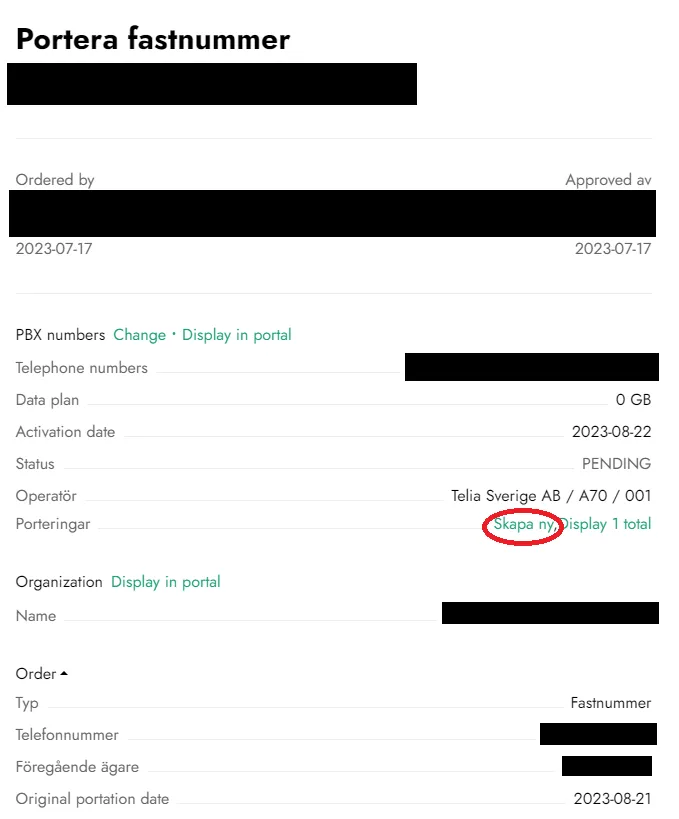
Click on the target work order to access its details. This is the command center for executing the necessary changes.
4. Initiate a New Porting
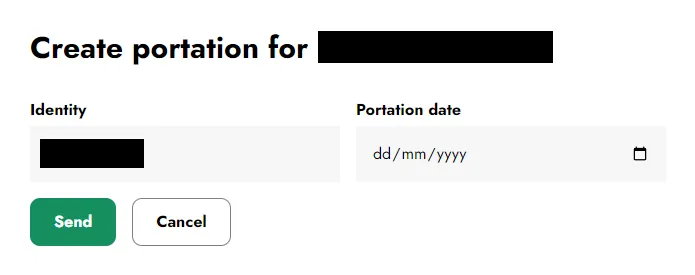
Within the work order interface, you'll find the button "Skapa Ny" indicating the creation of a new porting. This will open a window allowing you to select the date of the porting, with the rest of the information pre-filled:
5. Await Response
With the process initiated, exercise patience as our system takes over. The request will be transmitted to the present operator holding the number. Timely communication will inform you of the acceptance or rejection of the request.
With a focused approach and user-friendly interface, the Work Orders tab ensures a seamless number porting process. We are committed to simplifying tasks, enabling you to concentrate on sustaining uninterrupted communication within your operational framework.